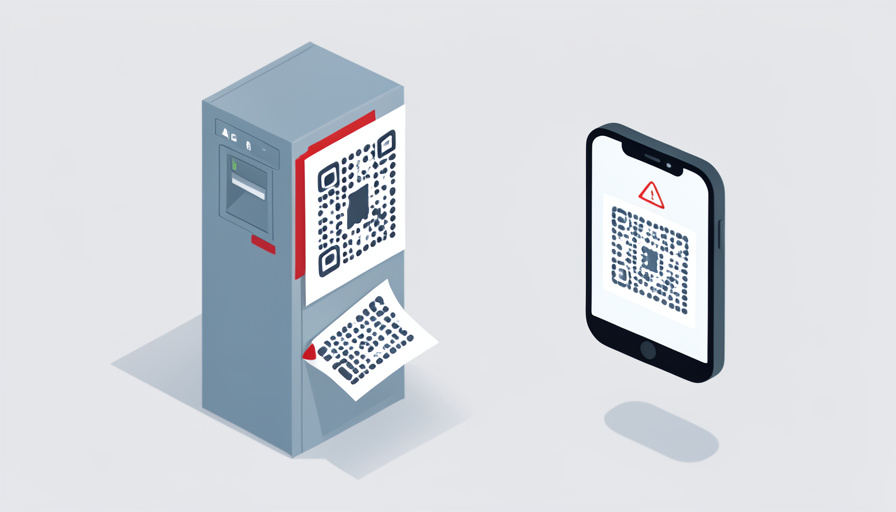

You are late, the meter is beeping, and there it is: a tidy QR code that promises to let you pay from your phone in seconds. You scan, a payment page loads, you tap in your card, and you walk away relieved. What you do not know is that a scammer peeled off the real code weeks ago, stuck their own on top, and just collected your card number along with your parking fee. The meter never got paid, but they did.
The QR code parking payment scam is almost invisible by design: a sticker over a sticker, and a fake page polished enough to fool a rushed driver. Federal regulators have warned nationally about fraudsters covering legitimate parking codes with their own, and losses run from a few dollars to thousands. Here are nine signs of a fake QR code on a meter or kiosk, so you can catch the scam before you ever type a card number.
Quick Take
- The core trick is a fake QR sticker placed over the real one, sending you to a page that steals your card and personal details.
- Before entering anything, check the link the code opens: it should be the city’s or official provider’s site, not a shortened or misspelled address.
- The safest habit is to skip roadside QR codes entirely and pay at the meter or through the city’s official app.
Table of Contents
1. A Sticker Placed Over the Original Code
The most direct clue is physical. Fake QR scams usually work by sticking a fraudulent code over the meter’s real one, so look for peeling edges, a sticker that sits slightly crooked, or the telltale sign of one sticker layered over another. Run a fingernail along the edge; if a second sticker lifts, do not scan it. Meters and kiosks that were built with a QR option have it printed or permanently affixed, so a loose, added-on sticker is the single most common giveaway that something is wrong.
2. A URL That Doesn’t Match the City or Provider
Most phone cameras preview the web address a QR code will open before you tap it, and that preview is your best defense. The link should clearly belong to your city or its official parking provider, so read it carefully. If the domain is unfamiliar, does not mention the city, or is a company you have never heard of handling municipal parking, stop there. Scammers count on people scanning and tapping in one motion; pausing to read the URL before it opens breaks the whole scheme.
3. A Shortened or Random-Looking Link
Even when a URL preview appears, its shape can betray it. A shortened link, or a web address that is a jumble of random characters rather than a clean, readable domain, is a warning sign for a parking payment. Legitimate city and provider sites use recognizable addresses, often ending in a government or established company domain. A link built to hide where it really goes has no business collecting your parking fee. When the address looks disguised, treat the code as fraudulent and pay another way.
4. A Page That Immediately Demands Card and Login Details
Watch what the page asks for and how fast. A fake payment page often jumps straight to demanding your full card number, billing address, and sometimes a login or personal details, right after the scan. Legitimate parking systems, especially ones you have used before, rarely require you to enter fresh credentials every single time, and they ask only for what a parking payment needs. If a page that loaded from a roadside sticker wants everything at once, that urgency to collect your data is a strong sign it was built to harvest it.
5. Off Branding, Fonts, or Spelling
Scam pages are often close, but not quite right. Compare the page that loads against what you would expect from your city or its parking app: mismatched logos, odd fonts, clumsy layout, or spelling and grammar mistakes all point to a counterfeit. Fraudsters copy real designs imperfectly and in a hurry. If the payment screen feels slightly off, looks generic, or does not carry the official branding you would recognize, trust that instinct. A polished scam still tends to leave small seams that a careful glance can catch.
6. A Prompt to Download an App or Grant Permissions
Be wary if the link pushes software rather than a simple payment. A code that tries to make you install an app from outside the official app store, or that asks for permissions like access to your contacts or location beyond what paying for parking requires, may be steering you toward malware. Real parking apps are downloaded from your phone’s app store, not from a link on a street sticker. When a scan leads to a download prompt or a permissions request instead of a straightforward payment, back out.
7. Pressure and Urgency
Manipulation shows up as haste. A fake page or the sticker itself may lean on urgency, warning that you will be ticketed or towed unless you pay right now through that exact code, to rush you past your judgment. Real parking enforcement does not depend on you scanning one particular sticker. When the situation is engineered to make you panic and pay immediately without checking anything, that pressure is itself a red flag, because scams rely on you acting faster than you think.
8. No Receipt, or the Meter Still Reads Unpaid
The aftermath can expose a scam you already fell for. If you pay and receive no confirmation, no receipt, or no email, or the meter or app still shows your spot as unpaid, your money likely went to a fraudster rather than the city. Legitimate systems confirm payment and update the meter’s status. Treat a missing receipt or an unchanged meter as a signal to check your bank account quickly, since catching a fraudulent charge early gives you the best chance to dispute it and limit the damage.
9. The QR Code Pushed as the Only Way to Pay
Consider what other options exist. Genuine parking meters and kiosks almost always accept payment directly, by card, coins, or the city’s own app, in addition to any QR option. A sign or sticker that presents scanning a QR code as the sole way to pay, with no card reader or official app mentioned, is suspicious. Scammers want to funnel you through their code because that is where they capture your details. When the QR is the only path offered, look for the machine’s own payment method instead.
How to Pay Safely
The simplest protection is to avoid roadside QR codes for payment altogether. Pay directly at the meter or kiosk, or use your city’s official parking app downloaded from your phone’s app store, which you can open yourself rather than reaching through a scanned link. If you do scan, read the URL preview before tapping and never enter card details on a page that looks off. The FTC’s alert on QR codes on parking meters is worth a read. And if you spot a suspicious sticker, report it to the city and local police, since peeling it off protects the next driver too.
Frequently Asked Questions
How does the fake QR code parking scam actually work?
Scammers print a QR code that links to a fraudulent payment page and stick it over the legitimate code on a parking meter, kiosk, or nearby sign. When you scan it and enter your card details to pay, the information goes to the scammer instead of the city, and the meter is never actually paid. The fake page is designed to look like a real parking payment site, so many people do not realize anything is wrong until they see an unexpected charge or a parking ticket. The physical sticker is the heart of the trick.
Is it safe to scan any QR code to pay for parking?
Not without checking first. QR codes themselves are neutral, but because anyone can print a sticker and place it on a meter, a roadside code is easy to tamper with. The safe approach is to inspect the sticker for tampering, preview the URL before tapping, and only enter payment details on a page that clearly belongs to your city or its official provider. Better still, skip the sticker and pay at the machine or through the official app you downloaded yourself, which removes the risk entirely.
What should I do if I already scanned a fake parking QR code?
Act quickly. If you entered card details, contact your bank or card issuer right away to report the potential fraud, watch for unauthorized charges, and consider having the card replaced. If you provided other personal information, be alert for follow-up phishing attempts. Report the incident to the FTC and to local authorities, and let the parking operator or city know about the tampered code so they can remove it. Fast action after a scam gives you the best chance to reverse charges and prevent further misuse of your information.
How can I tell a real parking QR code from a fake one?
Start with the sticker and the link. A real code is usually printed on or permanently affixed to the machine, while a fake is a stick-on that may peel or sit over another sticker. After scanning, the URL should clearly be your city or its official parking provider, not a shortened or misspelled address, and the page should match the official branding and ask only for what a payment needs. If any of those checks fail, or the machine offers no other way to pay, treat the code as fake and use the meter or official app instead.
Skip the Sticker, Pay the Meter
The QR-code parking scam succeeds on speed and trust: a fake sticker over a real one, and a page convincing enough that a hurried driver never questions it. Your defenses are simple and quick, though. Check the sticker for tampering, preview the URL before you tap, watch for a page that demands too much or looks slightly off, and confirm you actually got a receipt. Best of all, pay at the machine or through the city’s official app rather than a roadside code. A few seconds of caution keeps your card out of a scammer’s hands. For more on staying safe with your phone, browse Wayodd’s Mobile section.

























































No Comments
Leave a comment Cancel