

You opened Google Analytics to answer one question: how many people read yesterday’s post. Twenty minutes later you are lost in a menu of events, dimensions, and explorations, still without the number. GA4 was built for app funnels and enterprise marketers, not for a blogger who wants a weekly glance at what is working.
The good GA4 alternatives for WordPress solve two problems at once: they hand you a clean report you can read in seconds, and most of them collect data without cookies, so you can skip the consent banner for analytics entirely. Below are six tools worth a look, sorted by who each one fits, with the trade-offs that matter for a blog rather than a checkout flow.
Quick Picks
- Simplest hosted option: Plausible or Fathom, for a one-screen report and cookieless tracking out of the box.
- Closest to GA4’s depth: Matomo, when you want goals, funnels, and segments and will manage a bit more setup.
- Free and open-source: Umami, if you are comfortable self-hosting.
- Never leave WordPress: Burst Statistics or Independent Analytics, which keep the data and the dashboard inside your admin.
Table of Contents
How We Chose These
We looked for tools a blogger can actually live with, not enterprise suites. Three things mattered: a report simple enough to read at a glance, a privacy model that avoids cookies where possible so you can dodge the analytics consent banner, and a clean way to connect to WordPress, whether through a plugin, a snippet, or a native install. We weighed both hosted services and self-hosted or plugin options, since budget and comfort with servers vary. Each pick below notes what it does well and who it is wrong for.
Plausible Analytics
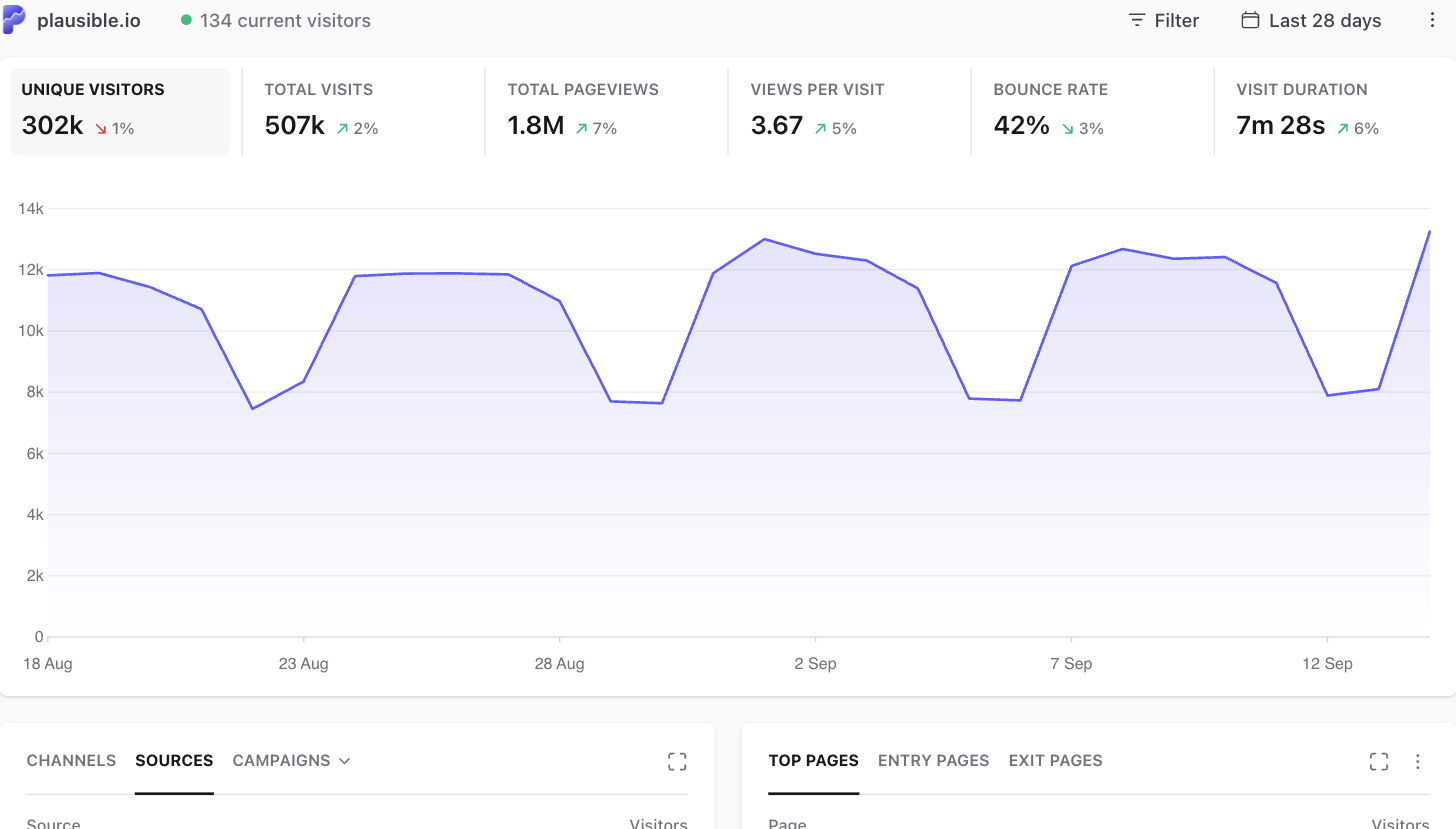
Plausible is the cleanest hosted pick for a blog. It is cookieless by default, so it needs no analytics consent banner in most cases, and its tracking script is tiny, which keeps your pages fast. The whole dashboard is one scrollable screen: visitors, top pages, sources, and a few key rates, with no menus to learn. It is open-source and European-hosted, and there is a WordPress plugin for a two-minute setup. Paid plans start around $9 a month by traffic; there is no permanent free tier, which is the main catch.
Fathom Analytics
Fathom sits right beside Plausible in spirit: cookieless, simple, and fast, with a single-page report built for quick decisions. Its selling point is flat pricing. One plan covers many sites with unlimited data retention, so a writer running several blogs pays once rather than per property. It bypasses many ad blockers and skips the consent banner for analytics. Plans start around $15 a month. If you host one small blog, it can cost more than Plausible; if you run a handful, the flat rate wins.
Matomo
Matomo is the pick when you miss GA4’s depth but not its complexity. It is the closest feature-for-feature match, with goals, funnels, segments, real-time views, and a built-in tag manager, plus optional heatmaps and session recordings. You can self-host it for free or pay for the cloud version. One caveat: it uses cookies out of the box, so consent-free tracking takes a few settings changes, turning on IP anonymization and the cookieless mode. Choose it when you want to dig into the data rather than glance at it, and will spend a little time configuring.
Umami
Umami is the free, open-source option for people comfortable running their own software. Self-hosted, it costs nothing beyond your server, collects no cookies, and shows a minimal one-page report much like Plausible’s. The trade-off is the setup: you need somewhere to run it and a willingness to handle updates yourself. There is a paid cloud tier if you want the same tool without the server work. For a technical blogger who already manages hosting, it is hard to beat on price and privacy.
Burst Statistics
Burst Statistics is a WordPress-native plugin, which means the data lives in your own site database and the report appears right inside wp-admin. It is privacy-first and consent-aware, designed to work alongside a cookie banner plugin so tracking pauses until it is allowed, and it can run without cookies. For a blogger who wants numbers without a second account or an external service, this keeps everything in one place. The reports are simpler than Matomo’s, which is the point. You can find it through the plugin directory in your dashboard.
Independent Analytics
Independent Analytics is another plugin that keeps analytics entirely inside WordPress. It reports pageviews, top content, referrers, and countries in a clean panel in your admin, with no external service holding your visitor data. Because processing happens on your own site, it leans privacy-friendly, and there is a pro tier for ecommerce and campaign tracking if you grow into it. It suits a writer who wants to open one dashboard, see what is working, and get back to writing. Install it from the WordPress plugin directory like any other.
How the Six Compare
| Tool | Hosting | Cookieless | Best for | Starting cost |
|---|---|---|---|---|
| Plausible | Hosted or self-host | By default | Simple hosted reports | ~$9/mo |
| Fathom | Hosted | By default | Multiple blogs, flat price | ~$15/mo |
| Matomo | Self-host or cloud | After setup | GA4-level depth | Free self-host |
| Umami | Self-host or cloud | By default | Free, technical users | Free self-host |
| Burst Statistics | WordPress plugin | Configurable | Data inside WordPress | Free plan |
| Independent Analytics | WordPress plugin | On-site processing | Reports in wp-admin | Free plan |
Frequently Asked Questions
Do these GA4 alternatives really let me skip the cookie consent banner?
For analytics, mostly yes. Tools that are cookieless by default, like Plausible, Fathom, and Umami, do not store identifiers on a visitor’s device, so under common interpretations of privacy law they do not trigger the analytics consent requirement. Matomo can reach the same place after you enable its cookieless mode. This covers only your analytics, though. If you run ads, embeds, or other trackers, you may still need a banner for those.
Which is the easiest to set up on WordPress?
The plugin-based tools are the fastest to start, since Burst Statistics and Independent Analytics install and report from inside wp-admin with no external account. Among hosted services, Plausible and Fathom both offer official WordPress plugins that add the tracking snippet for you, so setup is a couple of minutes. Matomo and self-hosted Umami take longer, because you are installing and maintaining the analytics software yourself.
Are free analytics tools good enough for a blog?
Often, yes. Self-hosted Umami and Matomo are free and capable, and the plugin options have real free tiers. For most bloggers the free versions answer the daily questions: how many readers, which posts, where they came from. You mainly pay for convenience, such as a hosted dashboard you do not maintain, or for advanced features like funnels and heatmaps that a typical blog does not need.
Will I lose my old Google Analytics history if I switch?
Your past GA data stays in Google until you delete the property, so you can export what you want first and keep the account read-only. The new tool starts collecting from the day you install it, so there is a clean break rather than a merge. Many bloggers run both side by side for a few weeks to compare the numbers, then drop the Google tag once they trust the replacement.
Do privacy-friendly tools undercount compared to GA4?
The counts often differ, but that does not mean one is wrong. Cookieless tools are less affected by ad blockers, which block Google Analytics heavily, so they sometimes report more traffic, not less. They also count a bit differently, measuring unique visitors without cross-session cookies. What matters for a blog is a consistent trend you can act on, and any of these tools gives you that.
Pick the One That Fits Your Blog
There is no single winner here, only the right fit for how you work. If you want to glance and go, Plausible or Fathom give you a clean report with no consent banner to build. If you crave GA4’s depth without its clutter, Matomo is the match. If free and self-hosted appeals, Umami delivers, and if you would rather never leave your dashboard, Burst Statistics or Independent Analytics keep it all in WordPress. Any of them beats squinting at GA4 for a number you should be able to see in seconds. For more on running a site well, browse Wayodd’s SEO section.


































































No Comments
Leave a comment Cancel